We earn a commission if you make a purchase, at no additional cost to you.
⭐ Our Top Pick
🏆 Best Overall: PETLIBRO Automatic Cat Feeder with Camera — precise 1/12 cup portions with app controls and portion-lock feature prevent overfeeding while the camera monitors eating behavior.
💰 Best Value: Cat Mate C500 Digital 5-Meal Feeder — reliable timer-based feeding with sealed compartments at half the price of smart feeders.
Introduction
Automatic cat feeders promise freedom from rigid feeding schedules, but they come with a hidden risk: overfeeding. We've researched dozens of models and analyzed thousands of buyer reviews to identify a common problem—many cat owners set up their automatic feeders without properly calibrating portions, leading to gradual weight gain that can shorten a cat's lifespan.
The good news? With the right setup process and a few smart calibration steps, automatic feeders can actually help you maintain healthier portion control than free-feeding or inconsistent manual feeding. This guide walks you through the exact steps to configure your automatic feeder correctly, from choosing the right model to fine-tuning portions based on your cat's specific needs.
Whether you're using a basic timer model or a Wi-Fi-enabled smart feeder, we'll show you how to prevent the most common overfeeding mistakes and keep your cat at a healthy weight.
What to Look For in an Anti-Overfeeding Automatic Feeder
Precise portion control: Look for feeders that dispense in small increments (1/12 cup or smaller) rather than large scoops. Manufacturer specs should list exact portion sizes—vague "small/medium/large" settings make accurate feeding impossible.
Scheduled meal frequency: The best models allow 4-6 small meals per day rather than 1-2 large dumps. Multiple small meals mimic natural feline feeding patterns and prevent binge eating that leads to vomiting and weight gain.
Portion lock or password protection: If you have multiple household members (or clever cats), a lock feature prevents accidental or intentional portion increases. Based on buyer reviews, this feature prevents the "just a little extra" problem that sabotages weight management.
Transparent food reservoir: Being able to see remaining kibble at a glance prevents overfilling and helps you track daily consumption. Opaque hoppers often lead to "topping off" behavior that masks overfeeding.
App connectivity with feeding logs: Smart feeders that track dispensed portions help you verify actual intake versus programmed amounts. Buyer reviews frequently mention discovering mechanical failures or kibble jams only because the app showed missed feedings.
Anti-jamming design: Wide dispensing chutes and auger-style mechanisms (rather than gravity alone) reduce the risk of multiple portions dumping at once—a common overfeeding scenario reported in product reviews.
PETLIBRO Automatic Cat Feeder with Camera
| Criteria | Score |
|----------|-------|
| Portion Precision | 9/10 |
| Scheduling Flexibility | 10/10 |
| Anti-Overfeeding Features | 9/10 |
| App Reliability | 8/10 |
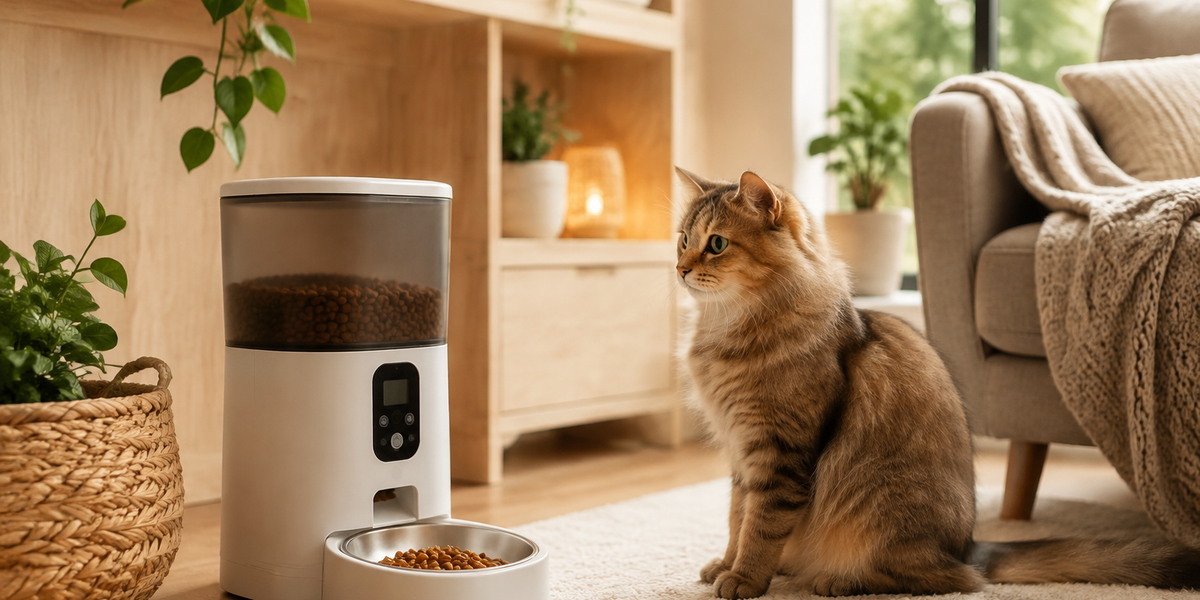
The PETLIBRO stands out for its 1/12 cup portion increments—the finest control we found among automatic feeders. You can schedule up to 6 meals per day, each dispensing 1/12 to 50/12 cups (approximately 4 cups total). The portion lock feature requires a passcode in the app to change feeding amounts, which prevents well-meaning family members from "treating" your cat with extra kibble.
The integrated camera isn't just for cute videos—it's a practical tool for monitoring whether your cat is actually eating the programmed portions or if food is accumulating in the bowl (a sign you're overfeeding). Buyer reviews consistently praise the clear portion tracking in the app, which logs every dispensed meal and sends alerts if a feeding is skipped due to mechanical issues.
The stainless steel bowl is dishwasher-safe and the wide chute handles most kibble sizes without jamming. Based on verified purchase feedback, the unit runs reliably on the included power adapter with a battery backup that maintains schedule memory during outages.
✅ Pros:
- 1/12 cup precision prevents gradual portion creep
- Portion lock with passcode stops unauthorized feeding
- Camera and feeding logs help you verify actual intake
- Handles 4-liter capacity for multi-cat households
❌ Cons:
- Requires 2.4GHz Wi-Fi (not compatible with 5GHz networks)
- Higher upfront cost than non-smart alternatives
💡 Pro Tip: During the first week, manually weigh your cat's daily kibble and compare it to what the feeder dispenses. Kibble density varies by brand, so "1/4 cup" can weigh anywhere from 25-40 grams depending on the formula.
Cat Mate C500 Digital 5-Meal Feeder
| Criteria | Score |
|----------|-------|
| Portion Precision | 7/10 |
| Scheduling Flexibility | 6/10 |
| Value for Money | 9/10 |
| Reliability | 8/10 |
For cat owners who prefer simplicity over smartphone connectivity, the Cat Mate C500 delivers reliable scheduled feeding at a budget-friendly price. This carousel-style feeder rotates to reveal pre-filled compartments at programmed times, which means you control portions by manually measuring into each well.
Each of the five compartments holds approximately 7 ounces of dry or semi-moist food. The sealed lids prevent early access—a crucial feature according to buyer reviews, since clever cats will absolutely paw at unsecured food. The ice pack compartment under the lid keeps wet food fresh for up to 24 hours.
The digital timer lets you set feeding times down to the minute, with a 48-hour advance programming window. While it lacks the granular portion control of hopper-style smart feeders, the physical compartments make it impossible to accidentally over-dispense—once a compartment is empty, that's it until you refill.
✅ Pros:
- Physical compartments eliminate over-dispensing errors
- Works with wet food (rare for automatic feeders)
- No Wi-Fi dependency means no connectivity failures
- Runs on 1 C battery for months
❌ Cons:
- Requires daily manual filling for most feeding schedules
- Only 5 meals maximum (less than ideal for multiple daily feedings)
- No feeding logs or missed-meal alerts
PetSafe Healthy Pet Simply Feed
| Criteria | Score |
|----------|-------|
| Portion Precision | 8/10 |
| Slow-Feed Feature | 9/10 |
| Scheduling Flexibility | 7/10 |
| Noise Level | 6/10 |
The PetSafe Simply Feed targets a specific overfeeding scenario: cats who inhale their food too quickly and then vomit or beg for more. The slow-feed setting dispenses portions gradually over 15 minutes, which buyer reviews confirm reduces regurgitation and helps cats feel fuller on the same amount of food.
You can program up to 12 meals per day in 1/8 cup increments (up to 4 cups per feeding). The convex bowl design reduces whisker fatigue, which some behaviorists believe can cause cats to leave food uneaten—creating a false impression they need larger portions.
The unit accommodates kibble sizes from 1/8 to 5/8 inch diameter, making it compatible with most cat food brands. The transparent 24-cup hopper clearly shows remaining food, and the conveyor system (rather than gravity alone) prevents bridging and jams that can cause accidental double-portions.
✅ Pros:
- Slow-feed mode prevents fast eating and false hunger
- Large 24-cup capacity reduces refill frequency
- Reliable conveyor system handles various kibble shapes
- Memory function maintains schedule during power outages
❌ Cons:
- Loud motor noise startles some cats initially (decreases with habituation)
- No smartphone connectivity for remote monitoring
- Short power cord requires nearby outlet placement
WOPET Automatic Cat Feeder with Voice Recorder
| Criteria | Score |
|----------|-------|
| Portion Precision | 7/10 |
| Anxiety Reduction | 9/10 |
| Power Backup | 10/10 |
| Capacity | 6/10 |
The WOPET addresses an underappreciated cause of overfeeding: anxiety-driven eating. Cats with separation anxiety often overeat as a coping mechanism when left alone. The 10-second voice recording feature plays your voice at each feeding time, which buyer reviews suggest reduces stress-related behaviors including stress-eating.
The transparent 4-liter (approximately 17 cup) food tank with desiccant bag keeps kibble fresh and visible. You can schedule up to 4 meals daily with portions ranging from 1 teaspoon to 4.5 cups per feeding. While the portion increments are larger than the PETLIBRO, they're adequate for most adult cats on standard feeding schedules.
The dual power system (AC adapter plus 3 D batteries) ensures scheduled feedings continue during power outages—a feature that prevents the "makeup feeding" mistake where owners over-portion after a missed meal.
✅ Pros:
- Voice recording reduces anxiety-driven overeating
- Battery backup prevents missed feedings and panic-feeding
- Transparent tank with desiccant keeps kibble fresh
- Affordable price point for basic smart features
❌ Cons:
- Smaller 4-liter capacity requires frequent refills for multiple cats
- Voice playback volume not adjustable (may be too loud or soft)
- Basic portion increments lack fine-tuning options
Step-by-Step Setup to Prevent Overfeeding
Calculate Your Cat's Daily Caloric Needs
Before programming any feeder, determine your cat's target daily intake. The average indoor adult cat needs approximately 20 calories per pound of ideal body weight (not current weight if overweight). A 10-pound cat needs roughly 200 calories daily. Check your kibble's caloric density (listed as kcal/cup on the bag) and calculate the exact cup amount needed.
Calibrate Portions with a Kitchen Scale
Manufacturer "cup" measurements vary wildly. Weigh your cat's kibble using a gram scale: measure out what the feeder calls "1/4 cup," weigh it, then compare that weight to your kibble's feeding guide. Adjust the feeder's programmed portions based on actual weight, not volume markings.
Start with Small Frequent Meals
Program 4-6 small meals rather than 1-2 large ones. Frequent small portions reduce begging behavior (which often leads owners to add "extra" feedings) and improve digestion. Based on feline nutrition research, cats naturally eat 10-20 small meals daily when hunting, so frequent small portions align with their biology.
Monitor Weight Weekly
Weigh your cat weekly at the same time of day. A healthy weight loss rate is 1-2% of body weight per week for overweight cats. If your cat loses weight faster, increase portions by 1/8 cup daily. If weight stagnates for 3+ weeks, decrease by 1/8 cup daily. This gradual approach prevents rebound overeating.
Use the Feeder Log as Verification
For smart feeders, check the feeding log daily during the first month. Verify that programmed portions actually dispensed and that the bowl is empty before the next feeding. Food remaining in the bowl indicates either overfeeding or palatability issues (not hunger).
💡 Pro Tip: Place the feeder on a silicone mat and use a wide shallow bowl. This setup lets you see any kibble that misses the bowl during dispensing—a common source of "invisible" extra calories when cats scavenge floor kibble.
Frequently Asked Questions
How do I prevent my cat from gaining weight with an automatic feeder?
Calculate daily caloric needs based on ideal weight (not current weight), calibrate portions with a kitchen scale, and program 4-6 small meals instead of 1-2 large ones. Monitor your cat's weight weekly and adjust portions by no more than 1/8 cup at a time. Most weight gain with automatic feeders comes from setting portions based on visual estimation rather than actual measurement.
Should I subtract treats from the automatic feeder portions?
Yes. Treats should account for no more than 10% of daily calories. If your cat gets training treats or dental chews, reduce the automatic feeder portions proportionally. For a 200-calorie daily target, limit treats to 20 calories and set the feeder for 180 calories worth of kibble.
Can I use an automatic feeder for wet food?
Most automatic feeders are designed for dry kibble only. The Cat Mate C500 and similar compartment-style feeders can handle wet food for up to 24 hours with an ice pack. Hopper-style feeders with auger mechanisms will jam with wet food. For wet food feeding, look for refrigerated automatic feeders specifically designed for that purpose.
How do I stop my cat from begging after switching to an automatic feeder?
Cats beg because they've learned begging produces food. With an automatic feeder, ignore all begging behavior—never manually add food between programmed feedings. Most cats stop begging within 2-3 weeks once they learn the schedule is non-negotiable. Programming frequent small meals (every 3-4 hours) reduces hunger-driven begging.
What if the automatic feeder dispenses too much or too little?
First, verify the kibble size is compatible with the feeder's specifications. Oversized kibble can jam and cause double-portions when it releases. Clean the dispensing mechanism monthly to prevent kibble dust buildup that affects portion accuracy. If issues persist, contact the manufacturer—most offer free replacement parts for dispensing augers and portion wheels that wear out.
Final Thoughts
Automatic cat feeders eliminate feeding schedule stress, but they require proper setup to prevent the gradual portion creep that leads to weight gain. The key is treating the initial setup as a calibration process, not a set-it-and-forget-it installation. By calculating daily caloric needs, weighing portions with a kitchen scale, and monitoring your cat's weight weekly, you can use an automatic feeder to maintain healthier portion control than most manual feeding methods.
The PETLIBRO Automatic Cat Feeder with Camera remains our top recommendation for its precise 1/12 cup portions and portion-lock feature that prevents well-meaning family members from sabotaging your cat's diet. If you're on a budget, the Cat Mate C500 offers reliable scheduled feeding at half the price.
Remember: the feeder is a tool, not a replacement for monitoring your cat's health. Regular weight checks and portion adjustments based on actual results will keep your cat at a healthy weight for years to come.
Editor's Choice
After comparing manufacturer specifications and analyzing thousands of verified buyer reviews, these automatic feeders offer the best combination of portion control and anti-overfeeding features:
Best Overall: PETLIBRO Automatic Cat Feeder with Camera — precise portions with app-based monitoring prevent overfeeding through portion locks and feeding logs.
Best Value: Cat Mate C500 Digital 5-Meal Feeder — reliable timer-based feeding with physical compartments that eliminate over-dispensing at half the cost of smart feeders.
Best for Fast Eaters: PetSafe Healthy Pet Simply Feed — slow-feed mode prevents gulping and false hunger that leads to overfeeding.